
AI
AI beside every tool, without handing over your secrets
Explain a token, fix broken JSON, generate sample data or ask a question, right next to the tool. It runs on Apple Intelligence on your Mac, or on your own key, and a secret scan stands in front of every cloud request.
- Apple Intelligence
- Claude
- OpenAI
- Gemini
- Grok
- Ollama and LM Studio
What it does
Four buttons and a question
Open the AI panel with ⌘J. The buttons a tool shows depend on the tool.
Explain
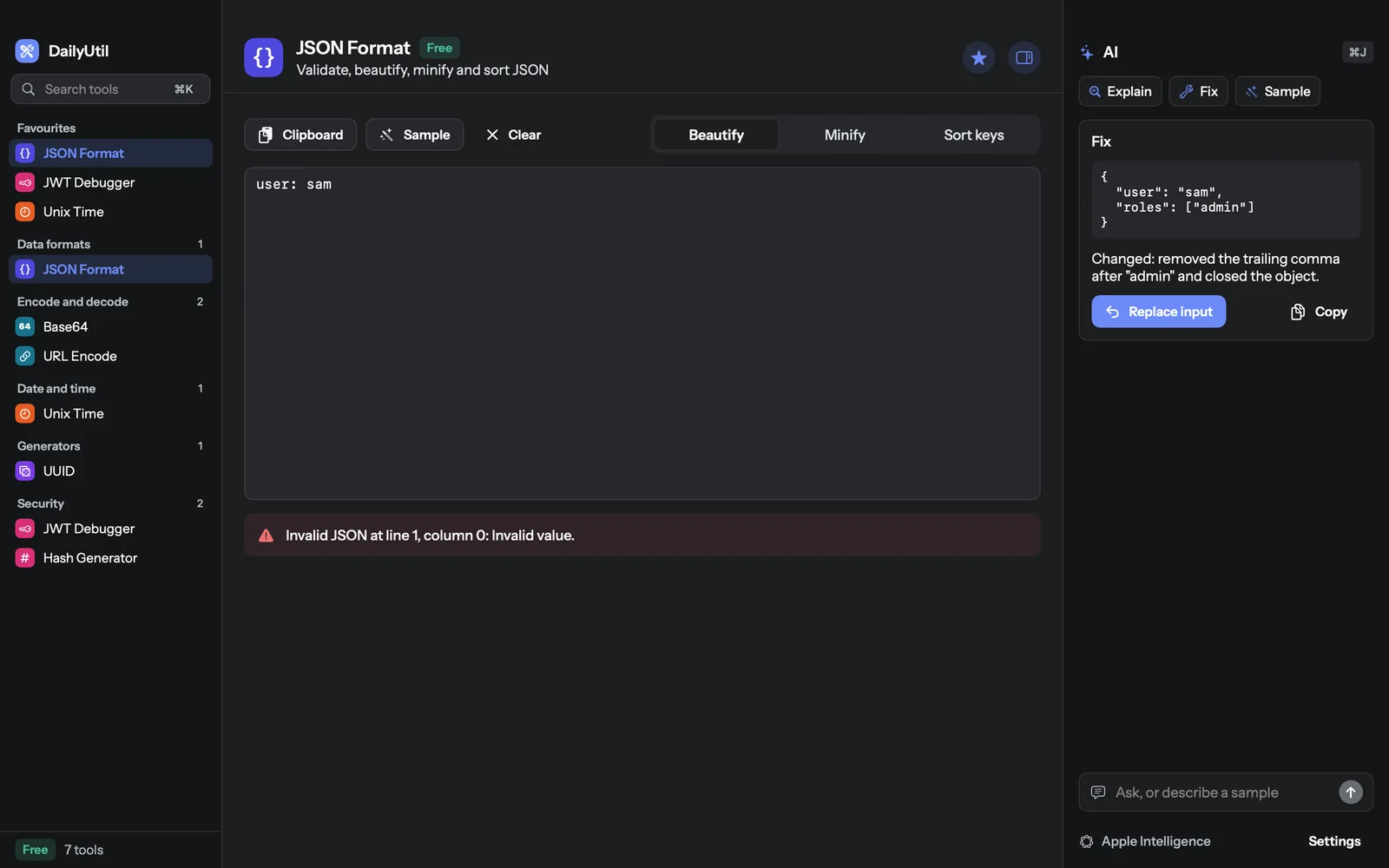
What the data in the tool means: a JWT's claims, a JSON document, a timestamp.
Fix
Repairs invalid input and says what changed. It replaces your input only when you press Replace, with Undo.
Sample
Describe the data you need, "a user with three orders", and get it in the tool.
Ask
A free question about what is in the tool, answered beside it.
Two engines
On your Mac, or on your key
You choose in Settings, AI. With no choice made, DailyUtil uses Apple Intelligence when it is ready, then the first key you saved. Every answer names the engine that wrote it.
Apple Intelligence
- Runs
- On your Mac
- Leaves the Mac
- Nothing
- Costs
- Nothing
- Needs
- macOS 26 on Apple Silicon, with Apple Intelligence on
- Good to know
- A short context, so very long input keeps its newest part. The first answer after launch takes longer while the model loads.
Your own key
- Providers
- Claude, OpenAI, Gemini, Grok, or any OpenAI-compatible server such as Ollama, LM Studio or OpenRouter
- Leaves the Mac
- The tool's input, after the secret scan, straight to that provider. Never through us.
- Costs
- What your provider charges you
- Key kept in
- The macOS Keychain, saved only after the provider accepts it
- Custom servers
- Must be https, unless on your own machine
Secret scan
Keys are caught before they leave.
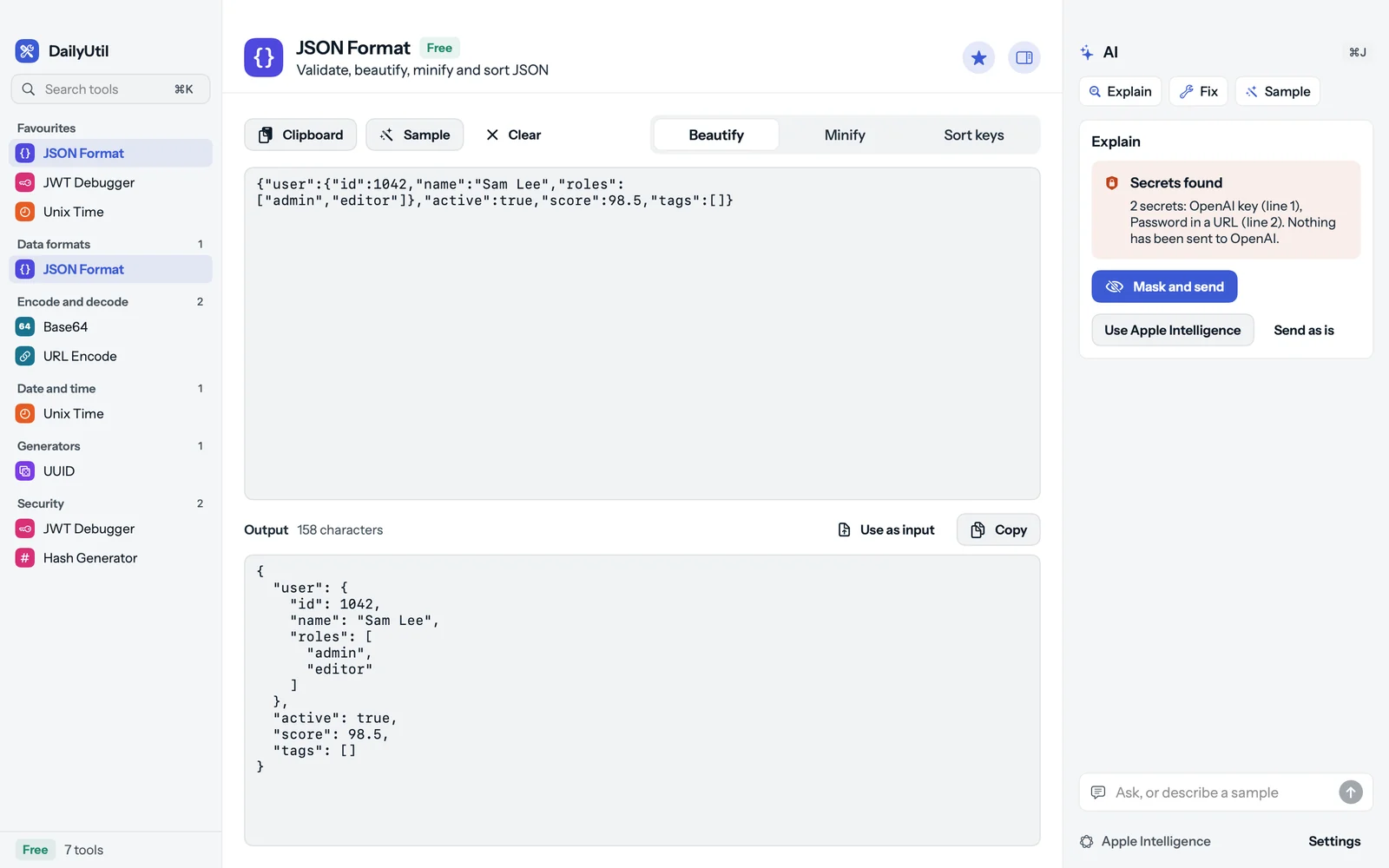
Logs carry tokens and .env files carry keys. Before any cloud request, DailyUtil scans the text on your Mac. If it finds something, nothing is sent until you choose.
Provider and cloud keys:
sk-… sk-ant-… AKIA… ghp_… xox… sk_live_…Private keys:
-----BEGIN … PRIVATE KEY-----Tokens:
JWTs, Authorization: Bearer …Passwords:
user:pass@host, PASSWORD=, SECRET=
Then pick Mask and send (the default), Use Apple Intelligence so nothing leaves the Mac, or Send as is. A JWT only ever goes as its decoded header and payload. Apple Intelligence skips the question: nothing leaves.
You stay in charge
What the AI is not allowed to do
What you paste is treated as data, not as instructions, and an answer never acts by itself.
No silent replace
A fix is shown first. Your input changes only when you press Replace input, and Undo brings it back.
Input is data
Text you paste is sent as data, apart from the instructions, so a line in it cannot steer the AI.
Nothing runs by itself
An answer never runs, opens or sends anything. Network tools send only when you press Run.
Checked by the tool
What the AI writes goes back through the tool, so invalid JSON shows as invalid instead of being hidden.
Per tool
Which tool gets which button
| Tool | AI actions | Status |
|---|---|---|
| JSON Format | Explain, Fix, Sample, Ask, Ask | in the app |
| Base64 | Explain, Ask | in the app |
| URL Encode | Explain, Ask | in the app |
| JWT Debugger | Explain, Spot problems, Ask | in the app |
| Unix Time | Explain, Ask | in the app |
| Text Diff | Summarise the change | next |
| RegExp Tester | Write from words, Explain | planned, Pro |
| Cron Parser | Write from words, Explain | planned, Pro |
| YAML and JSON | Fix | planned, Pro |
| XML Format | Fix, Explain | planned, Pro |
| Text and Case | Rewrite as asked | planned, Pro |
| HTML and Markdown Preview | Explain, Fix | planned, Pro |
| Subnet Calculator | Explain | planned, Pro |
| DNS Lookup | Explain records, Spot problems | planned, Pro |
| HTTP Request Builder | Build from words, Explain response | planned, Pro |
| Debug Assistant | Explain, Fix | planned, Pro |
What it costs
We sell no AI credits
Apple Intelligence
Free, on your Mac. Needs macOS 26 on Apple Silicon with Apple Intelligence turned on.
Your own key
Your provider bills you for what you use. A chat subscription is usually not an API key. A local server such as Ollama costs nothing per request.
Not in the app yet
- The Debug Assistant, for errors and stack traces, comes with Pro.
- Writing a regex or a cron line from words comes with the RegExp and Cron tools.
- AI on the network tools, such as explaining DNS records, comes with those tools.
Questions
About AI in DailyUtil
Which AI can DailyUtil use?
Apple Intelligence on your Mac, or your own key for Claude, OpenAI, Gemini or Grok, or any OpenAI-compatible server such as Ollama or LM Studio. You pick in Settings, AI.
What can the AI do?
Explain what is in a tool (a JWT's claims, a JSON document), fix invalid input such as broken JSON, generate a sample from a few words, and answer a question about the input. A fix is shown before it replaces anything, with Undo.
Does DailyUtil have its own AI server?
No. We run no AI service and keep no AI key. Apple Intelligence runs on your Mac; a cloud key sends the request from your Mac straight to that provider.
Is a ChatGPT or Claude subscription enough?
Usually not. A chat subscription and an API key are, as a rule, billed separately. You need an API key from the provider, or use Apple Intelligence, which is free.
Get DailyUtil
Try AI on a tool today
The free tools have AI too. Use Apple Intelligence on macOS 26, or add a key from Claude, OpenAI, Gemini, Grok or a local server.